NordVPN
Screenshots
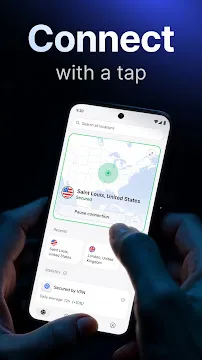
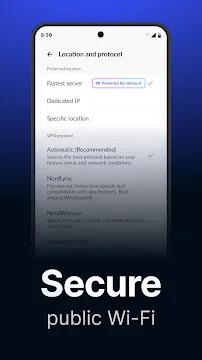
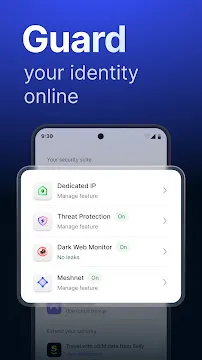
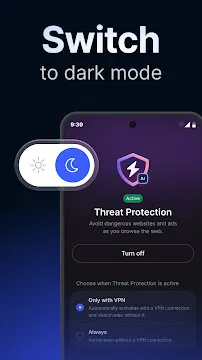
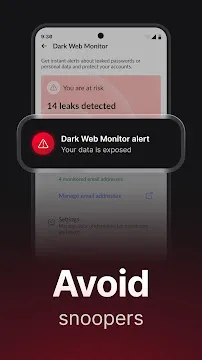
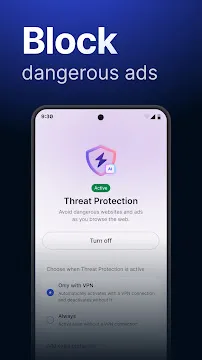
NordVPN for Android gives you a secure and private internet connection on your phone or tablet. This app encrypts your online traffic. It hides your real IP address. You can browse Wi-Fi hotspots without worry. The Android version includes special features like a kill switch and threat protection. It works quietly in the background. You stay safe from hackers, trackers, and intrusive ads. Let us explore how this tool upgrades your mobile experience.
Easy Setup and Simple Interface
Installing NordVPN on Android takes less than two minutes. You go to the download page. You tap the download NordVPN APK button. Then you log into your account. The app opens with a clean map and a connect button. You press one button to activate protection. The interface uses large icons and clear labels. You never struggle to find settings. A quick settings tile also appears on your phone. You can toggle VPN on or off from your notification shade. The whole design focuses on speed. You do not need technical skills. Families and beginners find it friendly. The app updates automatically. New security patches reach you without extra effort.
Strong Security and Privacy Features
NordVPN for Android uses AES-256 encryption. The same standard protects government data. Your internet provider cannot see your browsing. Public Wi-Fi in cafes or airports becomes safe. The app also has a kill switch. This feature cuts your internet if the VPN drops. Your real data never leaks by accident. Another key tool is the threat protection. It blocks malicious websites before they load. It also removes annoying pop-ups and trackers. You surf without ads chasing you. The app runs a strict no-logs policy. The company does not store your activity. You remain anonymous. For extra privacy, you can use the Onion Over VPN feature. It routes traffic through the Tor network. That is useful for journalists or activists.
Fast Speeds and Smart Server Choice
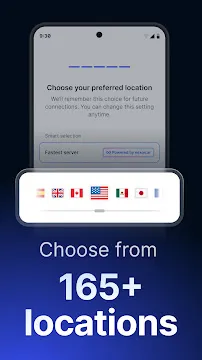
Many people worry about speed loss. NordVPN solves this with its NordLynx protocol. This is based on WireGuard technology. It provides fast connections without reducing security. You can stream HD video without buffering. You can play online games with low ping. The Android app automatically picks the best server for you. It looks at your location and network conditions. Alternatively, you choose from 60+ countries. You tap a city name. The app connects in seconds. Specialized servers exist for P2P sharing and double encryption. The double VPN sends your data through two separate servers. That adds an extra layer of protection. Speed tests show minimal drop on 5G and home Wi-Fi. You really get both safety and performance.
Unblocking Content and Streaming
NordVPN for Android works great for streaming. You open Netflix, Hulu, or BBC iPlayer. The app bypasses geo-restrictions. You watch your home shows while traveling abroad. SmartPlay technology runs behind the scenes. It combines VPN speed with smart DNS. You never configure anything manually. Just connect to a server in the right country. The app also unblocks social media platforms. Some schools or offices block YouTube or Instagram. You launch NordVPN. Those restrictions disappear instantly. Sports fans can stream live matches. News readers access blocked articles. The app works consistently because it refreshes its IP addresses often. This prevents streaming services from detecting the VPN. You gain freedom without complicated steps.
Optimized Battery and Data Usage
Mobile users worry about battery drain. NordVPN for Android manages power well. The app uses lightweight protocols. It does not keep your processor busy. In standby mode, it consumes almost nothing. You watch a two-hour movie. The VPN uses less than five percent of your battery. Data usage is also efficient. The encryption adds a small overhead. Usually about five to ten percent more data. Most unlimited plans never notice this. You can set the VPN to auto-connect on untrusted networks. For example, whenever you join a public Wi-Fi, the app activates. You never forget to turn it on. You can also whitelist certain apps. Some banking apps might work better outside the VPN. You exclude them from the tunnel. The rest of your traffic stays protected.
Split Tunneling and Customization
Split tunneling is a powerful option in NordVPN for Android. You choose which apps use the VPN. Other apps use your regular connection. Why use this feature? Some local services require your real location. Weather apps or ride-sharing need accurate GPS. You keep those outside the VPN. Meanwhile, your browser and email stay encrypted. You find split tunneling under the settings menu. The customization continues with protocol selection. You can pick OpenVPN UDP, OpenVPN TCP, or NordLynx. Each works better for different networks. For example, TCP helps on strict firewalls. The app also offers a dark mode. Your eyes rest during night browsing. You can even rename server locations. Save your favorite servers with custom names. This makes switching fast.
Final Thoughts
NordVPN for Android delivers strong protection without slowing you down. Your mobile data stays private. Public Wi-Fi becomes harmless. Streaming services open up. The app runs lightly on your battery. Setup takes one minute. The interface welcomes every user. Automatic features like kill switch and threat protection guard you nonstop. You also gain extra tools like split tunneling and double VPN. Whether you travel often or just want peace of mind, this app works. Download it from the official store. Activate it once. Then browse, stream, and share with confidence. Your Android device finally gets a complete security upgrade.